Introducing MXRay
MXRay is a tool to parse and analyze e-mail evidence (e.g., EML, MSG, PST, OST, MBOX) during DFIR engagements. It flags spoofed and malicious messages through header and authentication analysis, triages attachments, and enriches indicators with VirusTotal. It is written in Python, has a PyQt6 interface, and ships as a single self-contained executable.
Why?
During DFIR investigations involving Business Email Compromise (BEC), I felt the need for a free and open-source alternative to the commercial options. The main assumptions were:
- The tool should be able to parse e-mail files in multiple formats;
- Highlight important fields for easy analysis;
- Analyze attachments and extract relevant information, such as metadata, check for signs of steganography, extract macros from Office files, check the contents of archives and detect malicious software;
- Query VirusTotal for known malware and suspicious domains;
- Be self-contained and distributed as a single binary.
These assumptions guided the development of this tool.
Demonstration
Related tools
E-mail forensics is not new territory, but the landscape is split in two. On one side there are the commercial suites, which are complete but expensive, closed, and usually Windows-only. On the other side there are excellent open-source pieces that solve one problem each: libpff for PST/OST extraction, extract-msg for Outlook items, oletools for macros, pdfid for PDF structure, ExifTool for metadata, and a handful of web-based header analyzers for authentication verdicts.
In practice, an analyst ends up gluing these together with scripts, moving evidence between a terminal, a browser tab, and a viewer. MXRay keeps these functions under the hood and puts a single interface on top of them, so parsing, header analysis, attachment triage, YARA scanning, and IOC extraction happen over the same corpus without exporting anything in between. Two design decisions follow from working with real evidence:
- Nothing calls home. HTML bodies are previewed with no network stack and no JavaScript engine, so remote images and tracking pixels never render back to the sender. Live SPF/DMARC resolution and VirusTotal lookups are opt-in and explicit.
- Nothing to install. The build scripts produce one executable per platform (Windows and Linux), with the YARA rules and the ExifTool binary embedded, which matters when the analysis machine is an isolated VM.
Features
- Support for multiple formats:
.eml,.msg,.pst,.ost,.mbox. - Safe HTML rendering: HTML e-mails are previewed in a safe manner, with no network stack and no JavaScript engine, so nothing renders back to the sender.
- Header analysis: SPF/DKIM/DMARC verdicts taken from the receiving boundary,
Receivedchain with per-hop delays, originating IP, forged-timestamp detection. - Spoofing:
Return-Path/Reply-Tomismatch, display-name impersonation, homoglyph/punycode/lookalike domains, brand impersonation (EN/PT-BR). - Body: hidden text, tracking pixels, anchor-vs-
hrefspoofing, links to domains unrelated to the sender, URL shorteners, IP-literal and punycode links. - Attachments: MD5/SHA-1/SHA-256, entropy, signature-vs-extension mismatch, double extensions, RLO overrides, macro-capable Office files, encrypted archives, signs of steganography, data appended after an image end marker.
- Deep dive:
olevbaVBA source with auto-exec triggers and IOCs,pdfidobject counts, archive extraction (ZIP, 7z, RAR, TAR) with passwords harvested from the message body. - YARA: attachments, bodies and archive members. Rules from YARA Forge are shipped in the binary, as well as some rules I wrote based on real cases.
- IOCs: per-attachment, and a cross-message view ranked by how many messages each indicator appears in.
- VirusTotal lookups: attachment hashes, archive members and any IOC, cached and rate-limited.
- Live SPF/DMARC: evaluates the originating IP against published records.
- ExifTool: full metadata per attachment.
- Search: across the whole corpus or incrementally inside the pane on screen.
- Export: HTML, JSON, CSV, or a defanged IOC list.
Running and building binaries
MXRay requires Python 3.10+ (3.12 recommended) and the ExifTool binary in tools/ (exiftool.exe / exiftool.elf). To run it from the source tree:
pip3 install -r requirements.txt
python3 MXRay.py
Alternatively, each platform builds natively into one self-contained executable in dist/. Both scripts create a fresh virtual environment, install the pinned dependencies, verify every import, then run PyInstaller with unused Qt modules excluded to save space. build.bat also resolves the Python interpreter (via the py launcher) and the C++ toolchain that pypff needs, while build.sh does the equivalent with apt-get:
./build.sh   # Linux
build.bat    # Windows (as administrator)
Usage
Open evidence from File > Open evidence (Ctrl+O) or by dragging files and folders onto the window. Check File > Preferences to set your VirusTotal API key and any custom YARA rules you want.
The main shortcuts are:
| Key | Action |
|---|---|
Ctrl+D | Full assessment of the selected message |
Ctrl+F | Search across the corpus |
F3 / Shift+F3 | Find next / previous in the current pane |
Ctrl+Y | YARA scan the selected message and its attachments |
Ctrl+T | VirusTotal lookup for every attachment |
Ctrl+I | Cross-message IOC view |
Ctrl+Q | Quit |
Most work happens through context menus. Right-click a message in the tree to copy its SHA-256 or Message-ID, export it as .eml, or dump its attachments. Right-click an attachment to preview it, run ExifTool, query VirusTotal, scan it with YARA, or copy its hashes. Right-click an IOC to copy it plain or defanged, or send it to VirusTotal. Explore the message body, headers, and analysis on the main panel, and click on E-mail details to show a deep analysis of the current message.
Preferences, cached lookups and custom rules live in a single directory:
~/.mxray/ or C:\Users\<user>\.mxray
├── settings.ini      # Preferences, including the VirusTotal key
├── vt_cache.json     # Cached VirusTotal lookups
└── rules/            # Your custom YARA rules
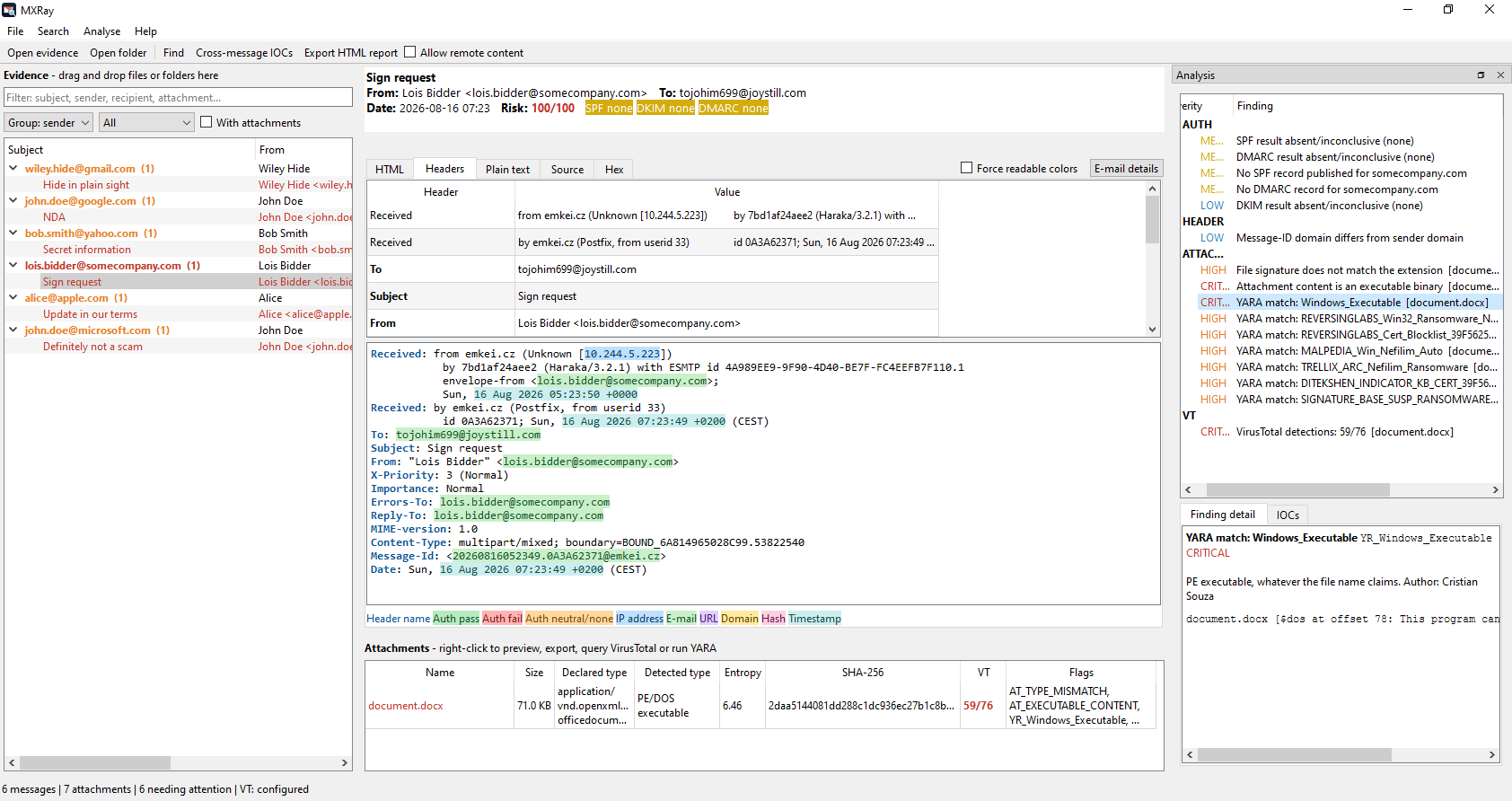
The image below shows the main screen of the tool. On the left is the list of loaded messages. The center panel holds the analysis view and the attachments, and on the right you will find the rules matched, the finding details, and the IOCs.
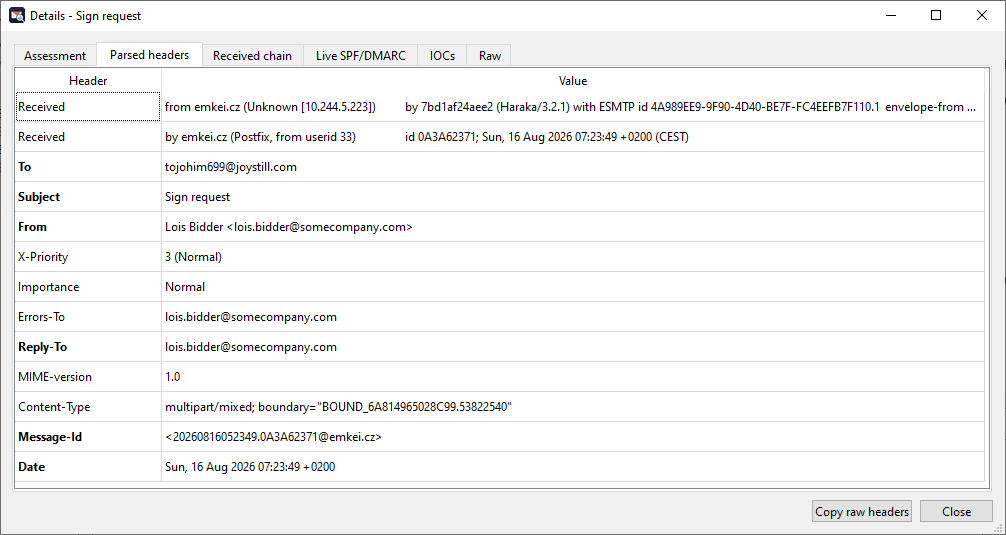
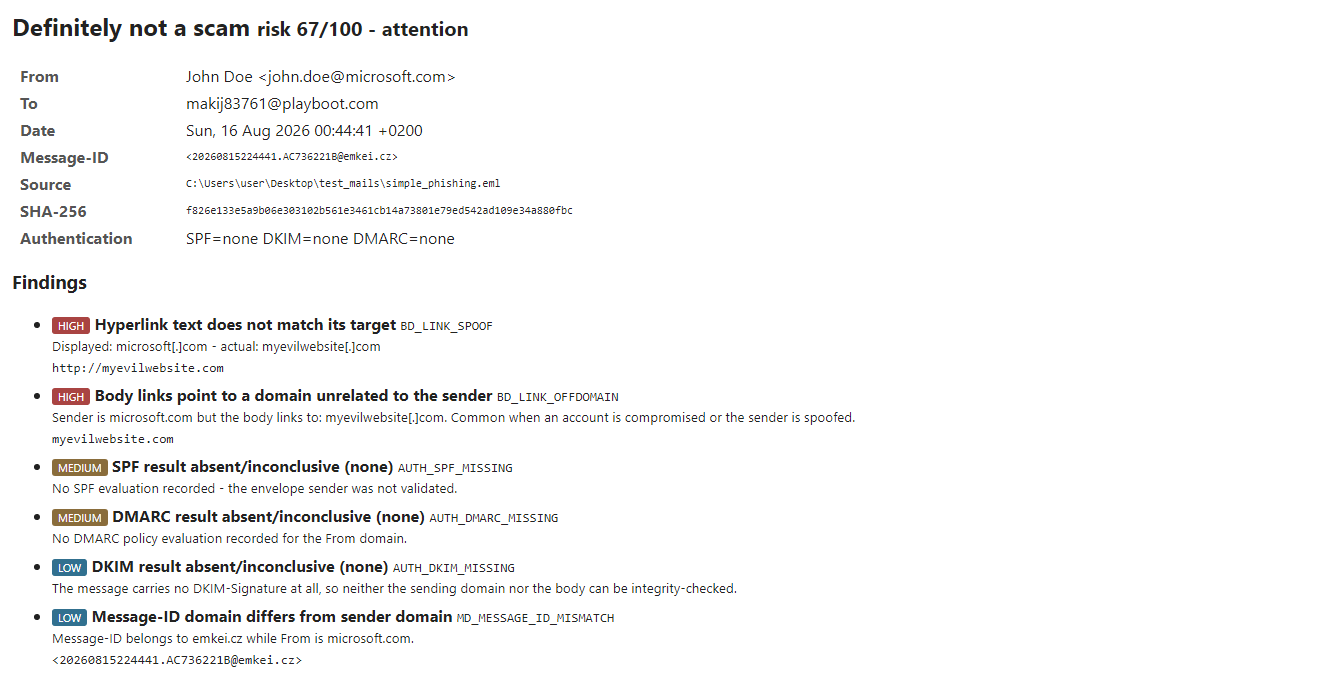
Click E-mail details to show the tool's assessment of the message, the parsed headers, the received chain, and the message IOCs, and to perform live SPF and DMARC checks.
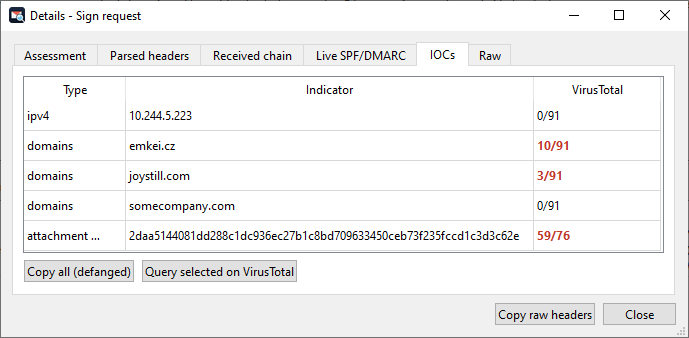
The IOCs tab allows you to copy all rows defanged or send hashes and URLs to VirusTotal.
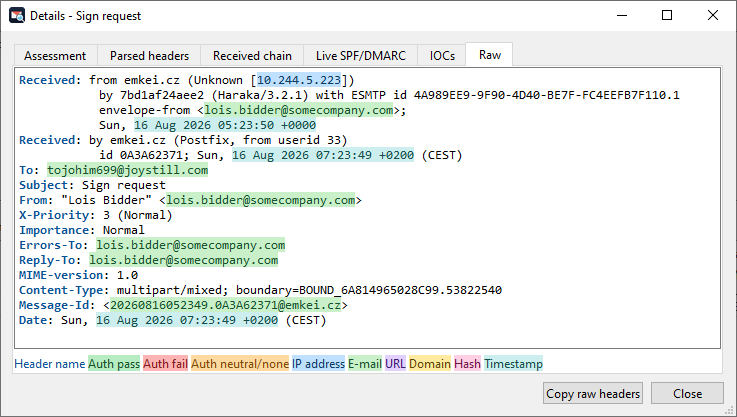
The Raw tab shows the e-mail headers, with highlights on important fields (the same as in the main screen), including authentication passes, fails, IP addresses, domains, e-mails, and hashes.
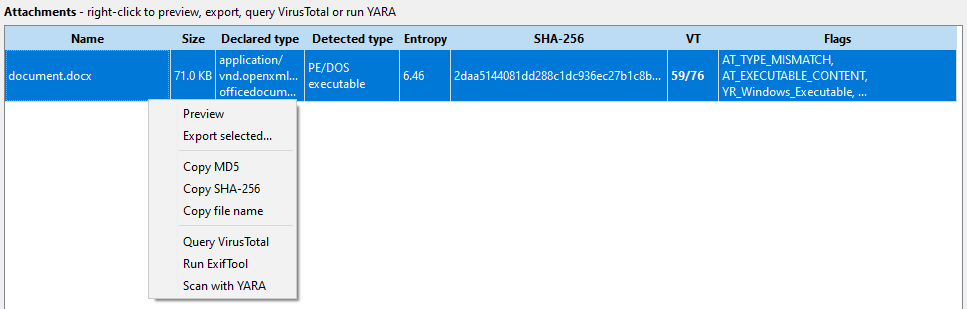
Right-click an attachment to preview it, export it, copy its hashes, query VirusTotal, run ExifTool, or scan it with YARA.
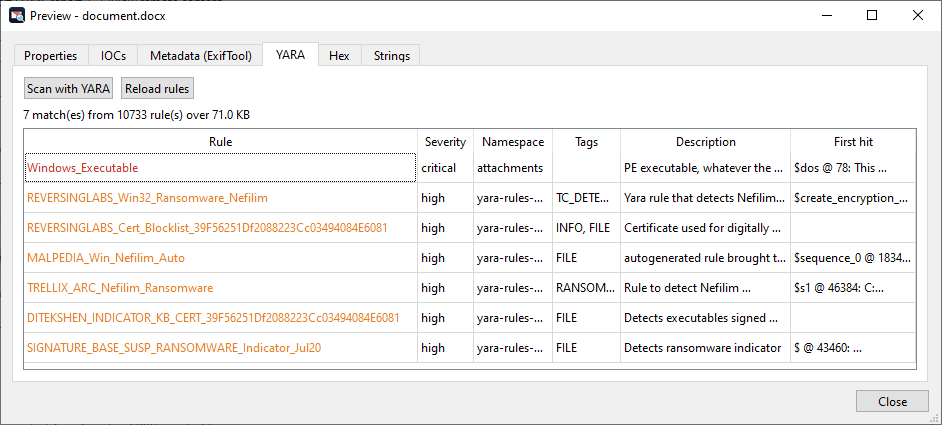
The YARA tab allows you to scan the current attachment using the default rules (including the ones from YARA Forge).
Attackers commonly ship malware in password-protected ZIP files. MXRay is able to harvest the password from the e-mail body (if present).
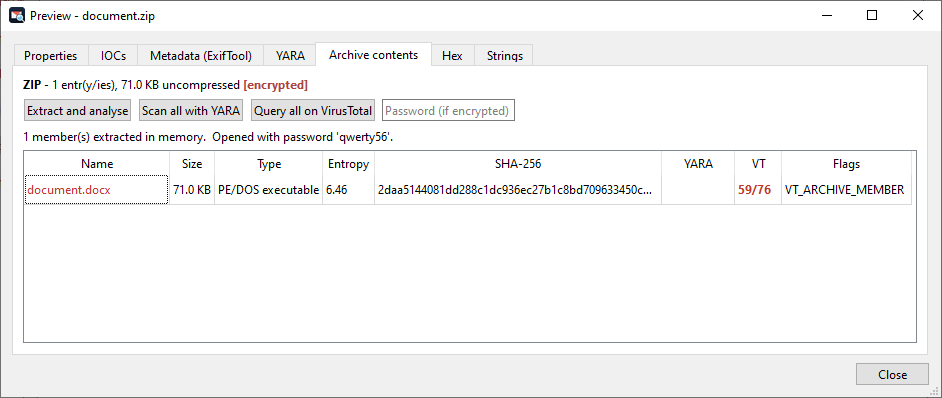
You can also analyze the ZIP contents in memory with YARA, or query VirusTotal for detections.
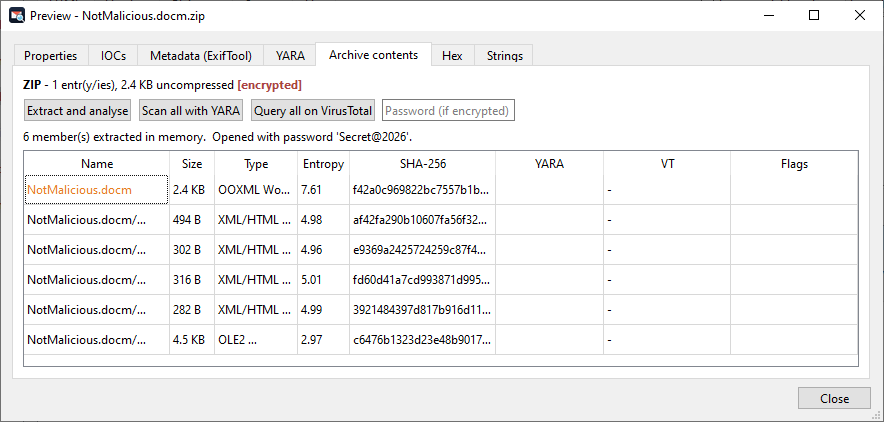
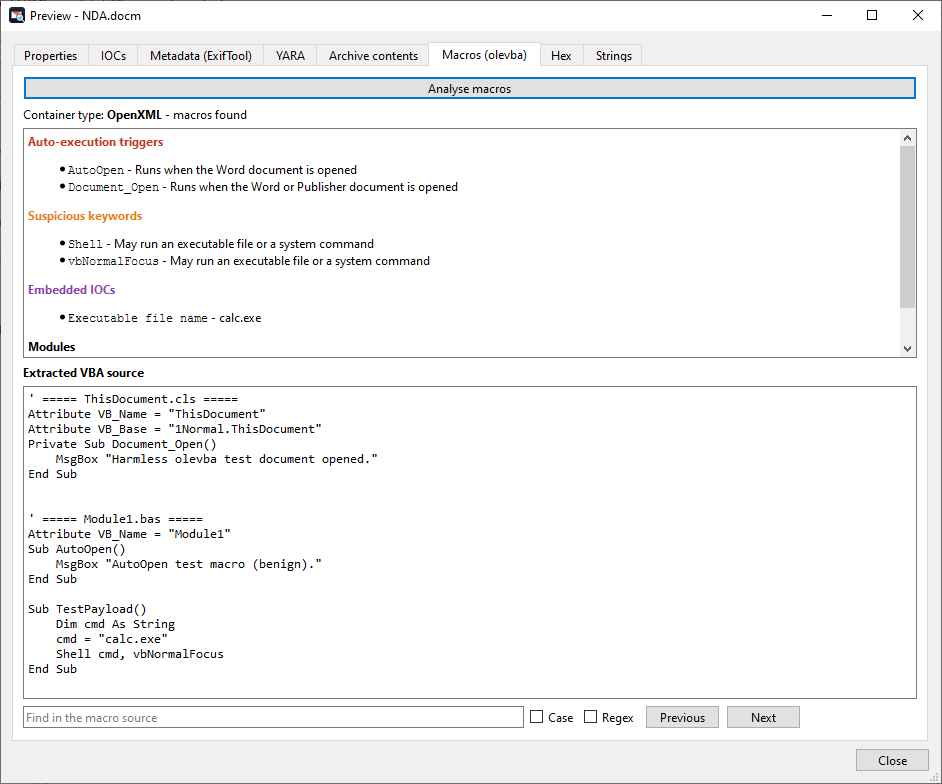
If the attachment is an Office file, you can use the Macros tab to check whether it contains malicious macros.
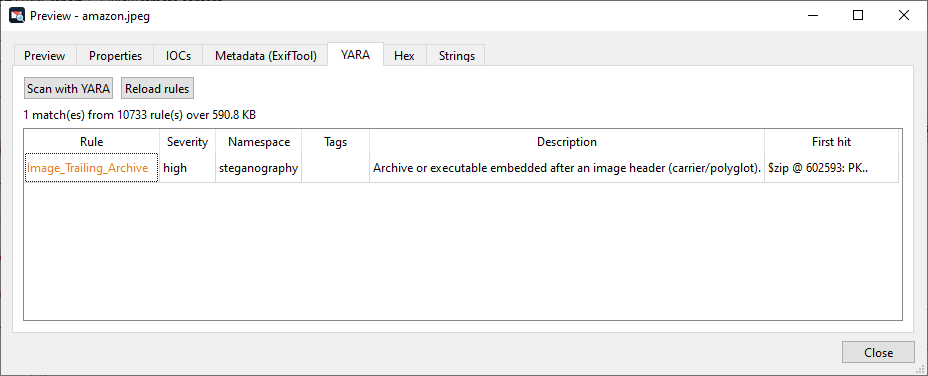
MXRay can also highlight signs of steganography techniques, such as content after an image's end marker. The shipped YARA rules are able to identify the type of appended data for the common scenarios (e.g., ZIP or PE files).
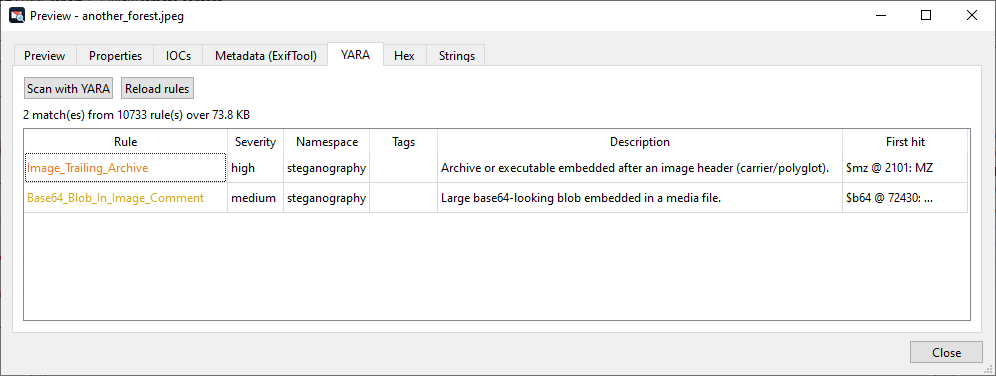
Base64 strings are also identified.
Finally, "Export HTML report" allows you to generate a comprehensive report on the analyzed data, including the VirusTotal detections, the YARA rules matched, and the IOCs.
Detection rules
Findings are grouped by prefix, which makes it easier to tell at a glance whether a message is suspicious because of its authentication results, its routing, or what it carries:
| Prefix | Area |
|---|---|
AUTH_* | SPF/DKIM/DMARC/ARC verdicts, unsigned messages, chain discrepancies |
ID_* | Sender identity: envelope/header mismatch, Reply-To pivot, brand impersonation, homoglyph/lookalike domains |
RT_* | Routing: private origin, backwards timestamps, missing rDNS, transit anomalies |
MD_* | Metadata: missing/forged Message-ID and Date, bulk mailers, BCC-only delivery |
SB_* | Subject: lure lexicon, RLO override, mixed scripts, fake Re: threads |
BD_* | Body: scripts, iframes, tracking pixels, link spoofing, risky URLs |
AT_* | Attachments: dangerous/double extensions, type mismatch, encrypted archives, high entropy, appended data, ExifTool metadata |
AT_VBA_* / AT_PDF_* | Macros (olevba) and PDF objects (pdfid) |
AT_ARCHIVE_* | Archive contents: executables, macro docs, nesting, compression bombs |
YR_* | YARA matches |
DNS_* | Live SPF/DMARC evaluation |
VT_* | VirusTotal detections |
Each message gets a 0-100 risk score, which is what the evidence tree sorts and filters on. In a mailbox with thousands of items, that score is usually enough to bring the handful of messages that matter to the top.
Conclusion
MXRay was born out of a practical need during BEC investigations, and it is meant to shorten the path between receiving a mailbox and having an answer about which messages are spoofed, which attachments are malicious, and which indicators are worth sharing. It is released under the MIT License and is available on GitHub. Bug reports, detection rules and pull requests are welcome.